> ## Documentation Index
> Fetch the complete documentation index at: https://docs.vals.ai/llms.txt
> Use this file to discover all available pages before exploring further.
# Import and Export
This page covers how to **import** and **export** data to and from the Vals platform: setting up a test suite, uploading historical Q\&A pairs, or pulling run results for offline analysis.
> **To get started**
>
> * If you're building a new suite, start with [Importing Data](#importing-data).
> * If you've already run an evaluation and want to analyze results, jump to [Exporting Results](#exporting-results).
***
## Importing Data
### Test Suite
A full test suite import includes tests, checks, context, tags, and any associated files. Only `Test Input` is required; all other fields are optional, so you can import inputs alone without defining any checks. Imported tests are appended after any existing tests in the suite.
If the import file includes a `Test Id` column and tests with matching IDs already exist in the suite, the import will be rejected by default. Check **Overwrite tests with matching Test IDs** in the import dialog to replace existing tests instead.
If you want to import existing model outputs and run checks against them, see [this page](/web_app/run#running-by-uploading-custom-question-answer-csv)
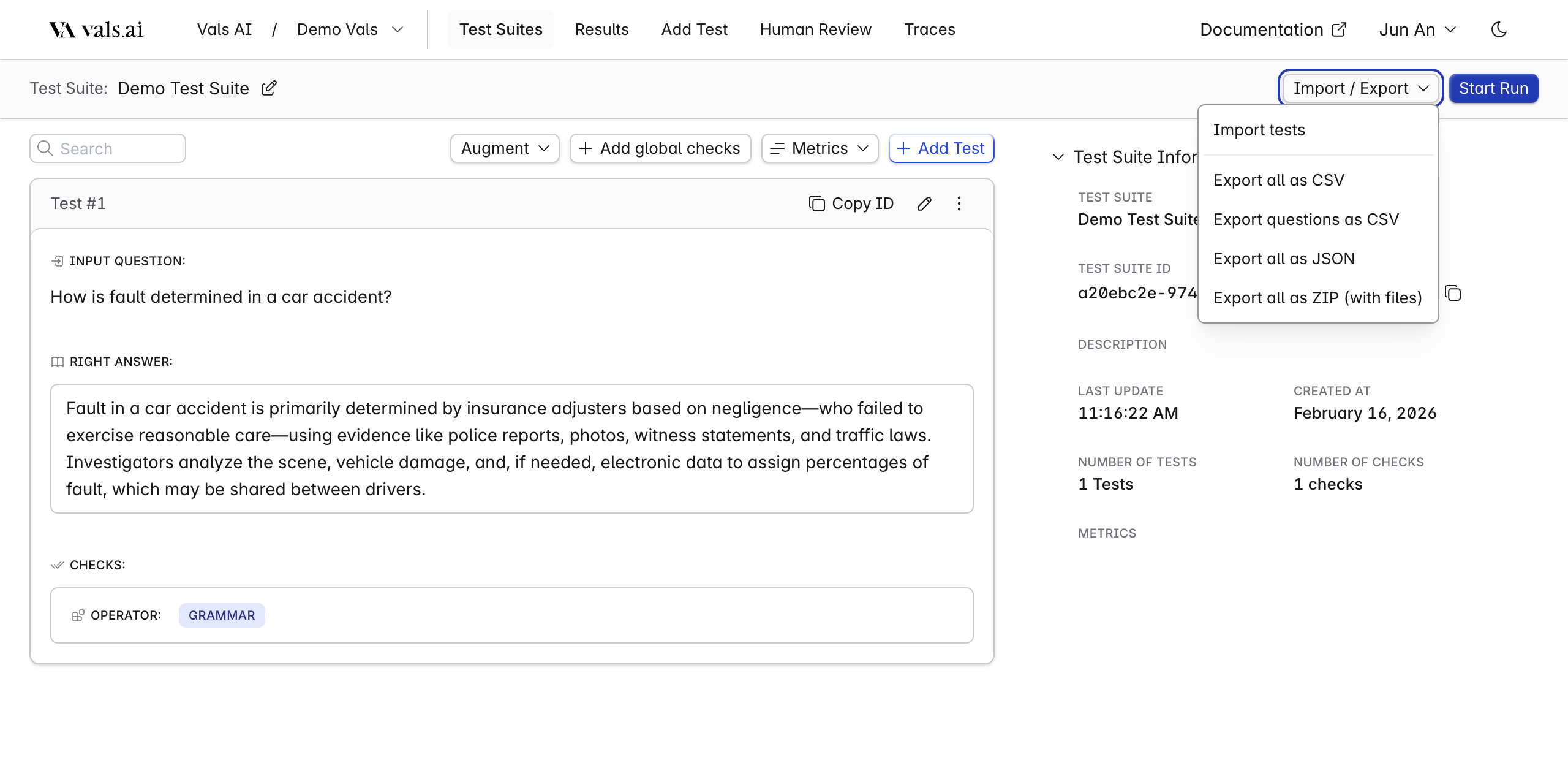 **Supported formats:** `CSV`, `JSON`, `ZIP`
> **If your tests include file attachments** (documents, images, etc.), use **ZIP**. Attached files should be stored under `documents/` inside the ZIP.
📎 [View CSV Example](https://drive.google.com/file/d/1P86stRMJsymORTR3Q8tkOM5b5DzQQfIj/view) · 📎 [View CSV Example (with Right Answer)](https://drive.google.com/file/d/15X15L-bBNo0eAQ4I20B8VRPl55EjIOqa/view) · 📎 [View ZIP Example (Files)](https://drive.google.com/file/d/1uS0qkfcuf_6QhpL3xlRWJeSYOupwhke5/view)
#### Test Columns
These columns define an individual test: the input sent to the model and any supporting context. Only `Test Input` field is required.
| Column | Type | Description |
| ------------------- | ---- | --------------------------------------------------------------------------------------------------------------------------------------------------------------------------------------------------------------- |
| Test Id | str | Optional custom identifier for the test. Must be unique within the suite and at most 64 characters. If omitted, a random ID is generated |
| Test Input | str | The prompt or question sent to the LLM (e.g., What is burden shifting under Title VII?) |
| Right Answer **\*** | str | The expected correct answer |
| Tags | str | Labels for organizing tests (e.g., `math`, `law`). Spread across rows. See [Formatting Rules](#tips-for-formatting-imports) |
| Files **\*** **\*** | str | Filename or path to an attached file (e.g., `documents/doc1.pdf`) |
| `context:` | str | Context column for injecting key-value context into a test. Each context field gets its own column, prefixed with `context:` (e.g., `context:date`, `context:user_id`). See [Context Columns](#context-columns) |
***\*** In most cases, either `Right Answer` or `Checks` are used. Learn more about [Right Answer](/web_app/right_answers)*\
***\*\*** Files will only work as expected for the .zip upload.*
#### Check Columns
Checks define how LLM responses are evaluated within a test.
| Column | Type | Description |
| -------- | ---- | --------------------------------------------------------------------------- |
| Operator | str | The evaluation method (e.g., `includes`, `excludes`) |
| Criteria | str | The value checked against the LLM response (e.g., `age`, `sex`, `religion`) |
| Column | Type | Description |
| -------------------- | ---- | ------------------------------------------------------------------------------- |
| Weight | int | Numeric importance for scoring (e.g., `1`, `2`) |
| Category | str | Label grouping checks by purpose (e.g., `Style`, `Correctness`) |
| Extraction Prompt | str | Instructions for pulling a specific value from the LLM output before evaluating |
| Conditional Operator | str | Operator for conditional evaluation |
| Conditional Criteria | str | Criteria used in conditional evaluation |
| Example Type | str | `positive` (should pass) or `negative` (should fail) |
| Example Value | str | A sample value used for the check |
### Tips for Formatting Imports
#### Spreading values down rows
For fields that support multiple values (like Tags or Checks), each value goes in its own row beneath the test, rather than being comma-separated in a single cell.
**Example:**
| Test Id | Test Input | Tags | Operator | Criteria |
| ------------ | ------------------------------ | ---- | ----------------- | ---------------------------------- |
| 19025787-... | Where is the Bay Area located? | Bay | includes | California |
| | | Easy | includes\_exactly | Northern California, United States |
| | | | excludes | Los Angeles |
| | | | excludes\_exactly | Atlantic Ocean |
Each row without a new Test Input belongs to the previous test. Tags stack down, and each check gets its own row.
#### Context Columns
Context is represented as columns rather than rows. Each context field has its own column, prefixed with `context:`. The column name after the prefix becomes the context key, and the cell value becomes the context value.
**Example:**
| Test Input | context:user\_id | context:language | Operator | Criteria |
| ---------------- | ---------------- | ---------------- | -------- | --------- |
| What is QSBS? | user-123 | en | includes | qualified |
| Describe vesting | user-456 | fr | includes | vesting |
This creates two tests, each with a `user_id` and `language` context entry. Empty cells in context columns are ignored — the context key will simply be omitted for that test.
#### Encoding
We support multiple encoding types. **UTF-8 is strongly recommended** for compatibility.
#### Criteria requirement
All non-unary operators require a `Criteria` value. Leaving it blank will cause the import to fail.
#### Global checks
When importing a file with global checks and tests, include a **blank row** between the global checks section and the tests section.
***
## Exporting Results
### Test Suite
**Supported formats:** `CSV`, `JSON`, `ZIP`
#### Test Columns
| Column | Description |
| --------------- | --------------------------------------------------------------------------------------------------------------------------- |
| Test Id | Unique identifier for the test |
| Test Input | The prompt or question sent to the LLM (e.g., What is burden shifting under Title VII?) |
| Right Answer | The expected correct answer |
| Tags | Labels for organizing tests (e.g., `math`, `law`). Spread across rows. See [Formatting Rules](#tips-for-formatting-imports) |
| Files | Filename or path to an attached file (e.g., `documents/doc1.pdf`) |
| `context:` | Context columns using the `context:` prefix (e.g., `context:date`, `context:user_id`). Each context field is its own column |
#### Check Columns
Checks define how LLM responses are evaluated within a test.
| Column | Description |
| -------------------- | ------------------------------------------------------------------------------- |
| Operator | The evaluation method (e.g., `includes`, `excludes`) |
| Criteria | The value checked against the LLM response (e.g., `age`, `sex`, `religion`) |
| Weight | Numeric importance for scoring (e.g., `1`, `2`) |
| Category | Label grouping checks by purpose (e.g., `Style`, `Correctness`) |
| Extraction Prompt | Instructions for pulling a specific value from the LLM output before evaluating |
| Conditional Operator | Operator for conditional evaluation |
| Conditional Criteria | Criteria used in conditional evaluation |
| Example Type | `positive` (should pass) or `negative` (should fail) |
| Example Value | A sample value used for the check |
### Auto Eval Results
Results are best reviewed directly in the platform. If you need to export them for custom reporting or offline storage, we support CSV and JSON.
**Supported formats:** `CSV`, `JSON`, `ZIP`
> **If your tests include file attachments** (documents, images, etc.), use **ZIP**. Attached files should be stored under `documents/` inside the ZIP.
📎 [View CSV Example](https://drive.google.com/file/d/1P86stRMJsymORTR3Q8tkOM5b5DzQQfIj/view) · 📎 [View CSV Example (with Right Answer)](https://drive.google.com/file/d/15X15L-bBNo0eAQ4I20B8VRPl55EjIOqa/view) · 📎 [View ZIP Example (Files)](https://drive.google.com/file/d/1uS0qkfcuf_6QhpL3xlRWJeSYOupwhke5/view)
#### Test Columns
These columns define an individual test: the input sent to the model and any supporting context. Only `Test Input` field is required.
| Column | Type | Description |
| ------------------- | ---- | --------------------------------------------------------------------------------------------------------------------------------------------------------------------------------------------------------------- |
| Test Id | str | Optional custom identifier for the test. Must be unique within the suite and at most 64 characters. If omitted, a random ID is generated |
| Test Input | str | The prompt or question sent to the LLM (e.g., What is burden shifting under Title VII?) |
| Right Answer **\*** | str | The expected correct answer |
| Tags | str | Labels for organizing tests (e.g., `math`, `law`). Spread across rows. See [Formatting Rules](#tips-for-formatting-imports) |
| Files **\*** **\*** | str | Filename or path to an attached file (e.g., `documents/doc1.pdf`) |
| `context:` | str | Context column for injecting key-value context into a test. Each context field gets its own column, prefixed with `context:` (e.g., `context:date`, `context:user_id`). See [Context Columns](#context-columns) |
***\*** In most cases, either `Right Answer` or `Checks` are used. Learn more about [Right Answer](/web_app/right_answers)*\
***\*\*** Files will only work as expected for the .zip upload.*
#### Check Columns
Checks define how LLM responses are evaluated within a test.
| Column | Type | Description |
| -------- | ---- | --------------------------------------------------------------------------- |
| Operator | str | The evaluation method (e.g., `includes`, `excludes`) |
| Criteria | str | The value checked against the LLM response (e.g., `age`, `sex`, `religion`) |
| Column | Type | Description |
| -------------------- | ---- | ------------------------------------------------------------------------------- |
| Weight | int | Numeric importance for scoring (e.g., `1`, `2`) |
| Category | str | Label grouping checks by purpose (e.g., `Style`, `Correctness`) |
| Extraction Prompt | str | Instructions for pulling a specific value from the LLM output before evaluating |
| Conditional Operator | str | Operator for conditional evaluation |
| Conditional Criteria | str | Criteria used in conditional evaluation |
| Example Type | str | `positive` (should pass) or `negative` (should fail) |
| Example Value | str | A sample value used for the check |
### Tips for Formatting Imports
#### Spreading values down rows
For fields that support multiple values (like Tags or Checks), each value goes in its own row beneath the test, rather than being comma-separated in a single cell.
**Example:**
| Test Id | Test Input | Tags | Operator | Criteria |
| ------------ | ------------------------------ | ---- | ----------------- | ---------------------------------- |
| 19025787-... | Where is the Bay Area located? | Bay | includes | California |
| | | Easy | includes\_exactly | Northern California, United States |
| | | | excludes | Los Angeles |
| | | | excludes\_exactly | Atlantic Ocean |
Each row without a new Test Input belongs to the previous test. Tags stack down, and each check gets its own row.
#### Context Columns
Context is represented as columns rather than rows. Each context field has its own column, prefixed with `context:`. The column name after the prefix becomes the context key, and the cell value becomes the context value.
**Example:**
| Test Input | context:user\_id | context:language | Operator | Criteria |
| ---------------- | ---------------- | ---------------- | -------- | --------- |
| What is QSBS? | user-123 | en | includes | qualified |
| Describe vesting | user-456 | fr | includes | vesting |
This creates two tests, each with a `user_id` and `language` context entry. Empty cells in context columns are ignored — the context key will simply be omitted for that test.
#### Encoding
We support multiple encoding types. **UTF-8 is strongly recommended** for compatibility.
#### Criteria requirement
All non-unary operators require a `Criteria` value. Leaving it blank will cause the import to fail.
#### Global checks
When importing a file with global checks and tests, include a **blank row** between the global checks section and the tests section.
***
## Exporting Results
### Test Suite
**Supported formats:** `CSV`, `JSON`, `ZIP`
#### Test Columns
| Column | Description |
| --------------- | --------------------------------------------------------------------------------------------------------------------------- |
| Test Id | Unique identifier for the test |
| Test Input | The prompt or question sent to the LLM (e.g., What is burden shifting under Title VII?) |
| Right Answer | The expected correct answer |
| Tags | Labels for organizing tests (e.g., `math`, `law`). Spread across rows. See [Formatting Rules](#tips-for-formatting-imports) |
| Files | Filename or path to an attached file (e.g., `documents/doc1.pdf`) |
| `context:` | Context columns using the `context:` prefix (e.g., `context:date`, `context:user_id`). Each context field is its own column |
#### Check Columns
Checks define how LLM responses are evaluated within a test.
| Column | Description |
| -------------------- | ------------------------------------------------------------------------------- |
| Operator | The evaluation method (e.g., `includes`, `excludes`) |
| Criteria | The value checked against the LLM response (e.g., `age`, `sex`, `religion`) |
| Weight | Numeric importance for scoring (e.g., `1`, `2`) |
| Category | Label grouping checks by purpose (e.g., `Style`, `Correctness`) |
| Extraction Prompt | Instructions for pulling a specific value from the LLM output before evaluating |
| Conditional Operator | Operator for conditional evaluation |
| Conditional Criteria | Criteria used in conditional evaluation |
| Example Type | `positive` (should pass) or `negative` (should fail) |
| Example Value | A sample value used for the check |
### Auto Eval Results
Results are best reviewed directly in the platform. If you need to export them for custom reporting or offline storage, we support CSV and JSON.
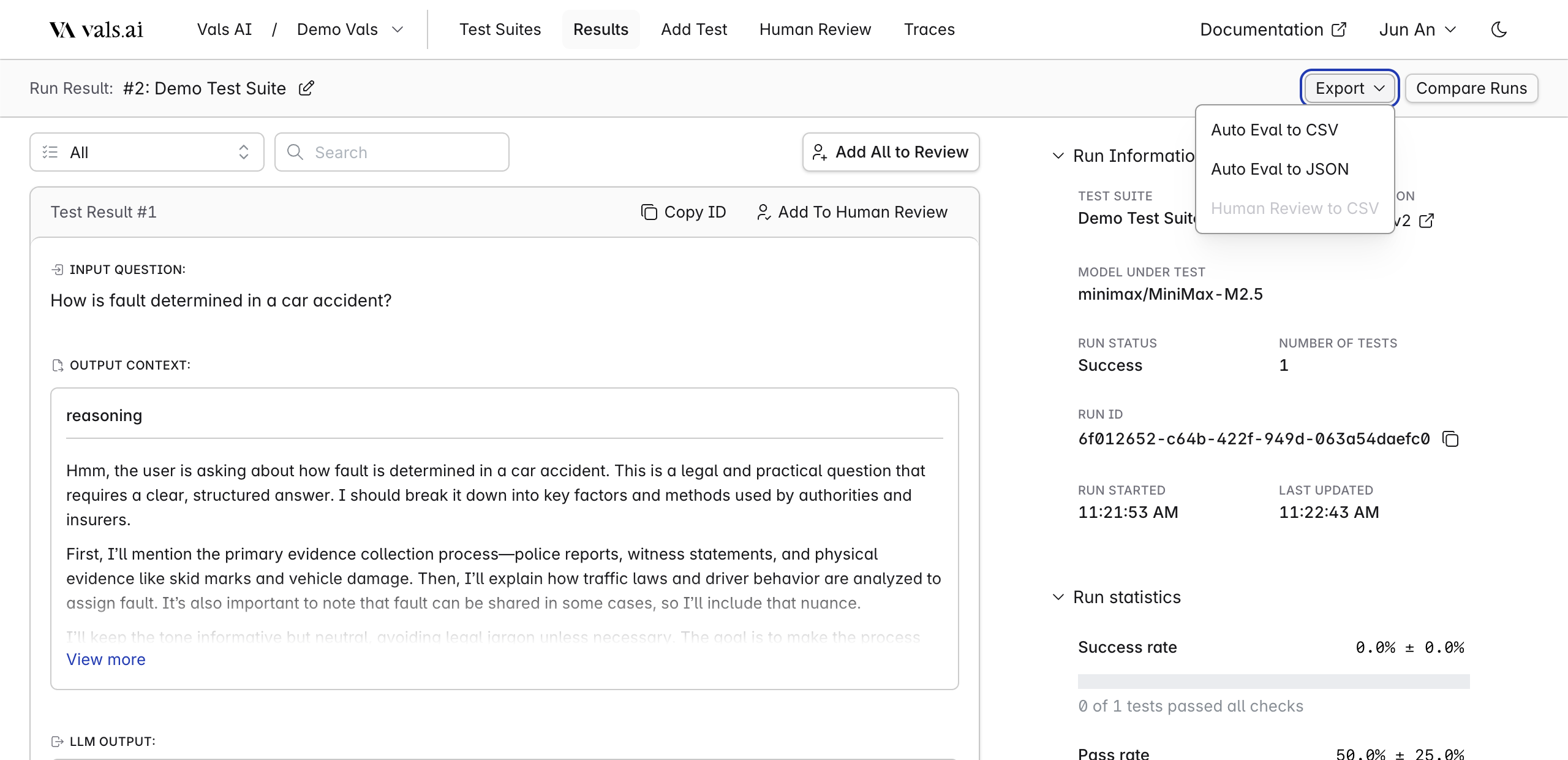 **Supported formats:** `CSV`, `JSON`
> We recommend CSV if the data needs to be reviewed by non-technical users, and JSON for any programmatic use case.
📎 [View CSV Example](https://drive.google.com/file/d/1UpXaAOIfIM1xA1ao9o7dM4X7JRyOSIlx/view?usp=sharing) · 📎 [View JSON Example](https://drive.google.com/file/d/1C2ubZ9wVMv8RaCVA01OzBE003NIDfK2M/view?usp=sharing)
#### Run Result
Top-level summary for the entire evaluation run.
| Column | Description |
| ------------------------------------ | ----------------------------------------------- |
| Run Id | Unique identifier for the run |
| Test Suite Id | ID of the suite that was run |
| Test Suite Title | Name of the suite |
| Run Status | Outcome of the run (e.g., `success`, `error`) |
| Run Error Message | Error message if the run failed |
| Run Error Analysis | LLM-generated analysis of failed check feedback |
| Completed At | When the run finished |
| Run Parameters | Configuration used during the run |
| Percent Of Checks Passed | Share of individual checks that passed |
| Amount Of Checks Passed | Count of checks that passed |
| Standard Deviation For Checks Passed | Variability in check pass rates |
| Percent Of Tests Passed | Share of tests where **all** checks passed |
| Amount Of Tests Passed | Count of fully passing tests |
| Standard Deviation For Tests Passed | Variability in test pass rates |
| Needs Review Percentage | Share of results flagged for human review |
#### Test Results
Per-test breakdown of inputs, outputs, and token usage.
| Column | Description |
| ---------------------- | ------------------------------------------------------------------------------------------------------------------------------------- |
| Test Result Id | Unique identifier for this test result |
| Test Id | Identifier of the originating test |
| Test Status | Outcome (e.g., `success`, `error`) |
| Test Error Message | Error message if the test failed |
| Test Input | The prompt sent to the LLM |
| LLM Output | The response generated by the LLM |
| Files | Files passed to the LLM during the test |
| In Tokens | Number of input tokens consumed |
| Out Tokens | Number of output tokens generated |
| Duration | Time taken to generate the response (seconds) |
| `context:` | Input context columns using the `context:` prefix (e.g., `context:user_id`). Each context field is its own column |
| `output_context:` | Output context columns using the `output_context:` prefix (e.g., `output_context:model`). Each output context field is its own column |
#### Check Results (Auto Eval)
> **Note:** Check columns in an export differ from check columns in a suite definition. Export checks reflect evaluation outcomes, not configuration.
| Column | Description |
| ------------------------- | ------------------------------------------------------------------- |
| Operator | The evaluation operator used |
| Criteria | The criteria evaluated against the LLM output |
| Auto Eval | Evaluation result (e.g., `pass`, `fail`; numeric scores left as-is) |
| Edited Auto Eval | Overridden score, if a human reviewer modified the result |
| Edited Auto Eval Feedback | Reviewer's reason for the override |
| Confidence Level | Model's confidence in its evaluation (e.g., `high`, `low`) |
| Feedback | LLM-generated explanation of the evaluation decision |
| Weight | The check's scoring weight |
| Extractor | Value extracted from LLM output using the extraction prompt |
| Conditional Operator | Operator used in conditional evaluation |
| Conditional Criteria | Criteria for the conditional check |
| Category | Check category (e.g., `Style`, `Correctness`) |
| Example Type | `positive` or `negative` |
| Example Value | Example value associated with the check |
### Human Review Results
Export completed human review data for analyzing reviewer agreement, test-level feedback, and metric evaluations outside the platform.
**Supported formats:** `CSV`
> Only **completed** reviews will be included in exports.
📎 [View Human Review Example](https://drive.google.com/file/d/10_bBcOxF7qXHeLCL_5J_wS7S9pd0T6Pu/view?usp=sharing)
#### Run Review
| Column | Description |
| ------------------------------ | ------------------------------------------------- |
| Run Id | Identifier of the evaluated run |
| Run Name | Display name of the run |
| Run Review Status | Review completion status (e.g., `completed`) |
| Run Review Created By | User who initiated the review |
| Run Review Created At | When the review was created |
| Run Review Completion Time | When the review was completed |
| Number Of Reviews | Number of reviewers assigned per test result |
| Assigned Reviewers | Users assigned to review |
| Pass Rate | Share of checks marked as pass by reviewers |
| Flagged Rate | Share of checks flagged by reviewers |
| Auto Eval ↔ Reviewer Agreement | Agreement rate between automated and human scores |
| Reviewer ↔ Reviewer Agreement | Agreement rate across reviewers |
#### Test Review
| Column | Description |
| -------------------- | --------------------------------------- |
| Test Result Id | Identifier for the reviewed test result |
| Test Input | The original prompt |
| LLM Output | The LLM's response |
| Files | Files included in the test |
| Completed At | When the review was submitted |
| Completed By | Reviewer who completed it |
| Test Review Feedback | Reviewer's written feedback |
#### Human Review Check
| Column | Description |
| ----------------- | --------------------------------------------------------------------------------------- |
| Check Type | `Auto-eval review` for checks from auto eval; otherwise, drawn from the review template |
| Metric Name | Name of the metric from the review template (blank for auto eval checks) |
| Operator | Evaluation operator |
| Criteria | Criteria evaluated |
| Auto Eval | Original automated score |
| Reviewer Response | Human reviewer's score or feedback (e.g., `pass`, `fail`) |
***
## Troubleshooting
**Common issues:**
* **Test Input is missing:** Ensure every test has a value in the `Test Input` column.
* **Global checks:** If your file includes global checks alongside tests, leave a **blank row** between the global checks section and the tests section.
* **Duplicate questions when importing Q\&A pairs:** Check for repeated rows in your CSV.
* **Missing criteria:** Non-unary operators require a `Criteria` value. Don't leave this blank.
* **Values comma-separated in one cell instead of spread across rows:** See [Formatting Rules](#tips-for-formatting-imports) above.
* **Context columns not being imported:** Make sure all context column headers are prefixed with `context:` (e.g., `context:user_id`, not just `user_id`).
If you run into an issue that isn't covered here, reach out at [contact@vals.ai](mailto:contact@vals.ai).
**Supported formats:** `CSV`, `JSON`
> We recommend CSV if the data needs to be reviewed by non-technical users, and JSON for any programmatic use case.
📎 [View CSV Example](https://drive.google.com/file/d/1UpXaAOIfIM1xA1ao9o7dM4X7JRyOSIlx/view?usp=sharing) · 📎 [View JSON Example](https://drive.google.com/file/d/1C2ubZ9wVMv8RaCVA01OzBE003NIDfK2M/view?usp=sharing)
#### Run Result
Top-level summary for the entire evaluation run.
| Column | Description |
| ------------------------------------ | ----------------------------------------------- |
| Run Id | Unique identifier for the run |
| Test Suite Id | ID of the suite that was run |
| Test Suite Title | Name of the suite |
| Run Status | Outcome of the run (e.g., `success`, `error`) |
| Run Error Message | Error message if the run failed |
| Run Error Analysis | LLM-generated analysis of failed check feedback |
| Completed At | When the run finished |
| Run Parameters | Configuration used during the run |
| Percent Of Checks Passed | Share of individual checks that passed |
| Amount Of Checks Passed | Count of checks that passed |
| Standard Deviation For Checks Passed | Variability in check pass rates |
| Percent Of Tests Passed | Share of tests where **all** checks passed |
| Amount Of Tests Passed | Count of fully passing tests |
| Standard Deviation For Tests Passed | Variability in test pass rates |
| Needs Review Percentage | Share of results flagged for human review |
#### Test Results
Per-test breakdown of inputs, outputs, and token usage.
| Column | Description |
| ---------------------- | ------------------------------------------------------------------------------------------------------------------------------------- |
| Test Result Id | Unique identifier for this test result |
| Test Id | Identifier of the originating test |
| Test Status | Outcome (e.g., `success`, `error`) |
| Test Error Message | Error message if the test failed |
| Test Input | The prompt sent to the LLM |
| LLM Output | The response generated by the LLM |
| Files | Files passed to the LLM during the test |
| In Tokens | Number of input tokens consumed |
| Out Tokens | Number of output tokens generated |
| Duration | Time taken to generate the response (seconds) |
| `context:` | Input context columns using the `context:` prefix (e.g., `context:user_id`). Each context field is its own column |
| `output_context:` | Output context columns using the `output_context:` prefix (e.g., `output_context:model`). Each output context field is its own column |
#### Check Results (Auto Eval)
> **Note:** Check columns in an export differ from check columns in a suite definition. Export checks reflect evaluation outcomes, not configuration.
| Column | Description |
| ------------------------- | ------------------------------------------------------------------- |
| Operator | The evaluation operator used |
| Criteria | The criteria evaluated against the LLM output |
| Auto Eval | Evaluation result (e.g., `pass`, `fail`; numeric scores left as-is) |
| Edited Auto Eval | Overridden score, if a human reviewer modified the result |
| Edited Auto Eval Feedback | Reviewer's reason for the override |
| Confidence Level | Model's confidence in its evaluation (e.g., `high`, `low`) |
| Feedback | LLM-generated explanation of the evaluation decision |
| Weight | The check's scoring weight |
| Extractor | Value extracted from LLM output using the extraction prompt |
| Conditional Operator | Operator used in conditional evaluation |
| Conditional Criteria | Criteria for the conditional check |
| Category | Check category (e.g., `Style`, `Correctness`) |
| Example Type | `positive` or `negative` |
| Example Value | Example value associated with the check |
### Human Review Results
Export completed human review data for analyzing reviewer agreement, test-level feedback, and metric evaluations outside the platform.
**Supported formats:** `CSV`
> Only **completed** reviews will be included in exports.
📎 [View Human Review Example](https://drive.google.com/file/d/10_bBcOxF7qXHeLCL_5J_wS7S9pd0T6Pu/view?usp=sharing)
#### Run Review
| Column | Description |
| ------------------------------ | ------------------------------------------------- |
| Run Id | Identifier of the evaluated run |
| Run Name | Display name of the run |
| Run Review Status | Review completion status (e.g., `completed`) |
| Run Review Created By | User who initiated the review |
| Run Review Created At | When the review was created |
| Run Review Completion Time | When the review was completed |
| Number Of Reviews | Number of reviewers assigned per test result |
| Assigned Reviewers | Users assigned to review |
| Pass Rate | Share of checks marked as pass by reviewers |
| Flagged Rate | Share of checks flagged by reviewers |
| Auto Eval ↔ Reviewer Agreement | Agreement rate between automated and human scores |
| Reviewer ↔ Reviewer Agreement | Agreement rate across reviewers |
#### Test Review
| Column | Description |
| -------------------- | --------------------------------------- |
| Test Result Id | Identifier for the reviewed test result |
| Test Input | The original prompt |
| LLM Output | The LLM's response |
| Files | Files included in the test |
| Completed At | When the review was submitted |
| Completed By | Reviewer who completed it |
| Test Review Feedback | Reviewer's written feedback |
#### Human Review Check
| Column | Description |
| ----------------- | --------------------------------------------------------------------------------------- |
| Check Type | `Auto-eval review` for checks from auto eval; otherwise, drawn from the review template |
| Metric Name | Name of the metric from the review template (blank for auto eval checks) |
| Operator | Evaluation operator |
| Criteria | Criteria evaluated |
| Auto Eval | Original automated score |
| Reviewer Response | Human reviewer's score or feedback (e.g., `pass`, `fail`) |
***
## Troubleshooting
**Common issues:**
* **Test Input is missing:** Ensure every test has a value in the `Test Input` column.
* **Global checks:** If your file includes global checks alongside tests, leave a **blank row** between the global checks section and the tests section.
* **Duplicate questions when importing Q\&A pairs:** Check for repeated rows in your CSV.
* **Missing criteria:** Non-unary operators require a `Criteria` value. Don't leave this blank.
* **Values comma-separated in one cell instead of spread across rows:** See [Formatting Rules](#tips-for-formatting-imports) above.
* **Context columns not being imported:** Make sure all context column headers are prefixed with `context:` (e.g., `context:user_id`, not just `user_id`).
If you run into an issue that isn't covered here, reach out at [contact@vals.ai](mailto:contact@vals.ai).