> ## Documentation Index
> Fetch the complete documentation index at: https://docs.vals.ai/llms.txt
> Use this file to discover all available pages before exploring further.
# Custom Metrics
## Intro
Custom Metrics allow you to define your own metrics for your runs. This is done by defining a function that takes in the output of a test, and returns a pass rate.
A basic example that calculates the pass rate if the evaluation is greater than 0.5:
```python theme={null}
import pandas as pd
def custom_metric_function(df: pd.DataFrame) -> float:
if df.empty or "eval" not in df:
return 0.0
total = len(df)
passed = (df["eval"] > 0.5).sum()
return passed / total # percentage (between 0 and 1)
```
# Managing Custom Metrics
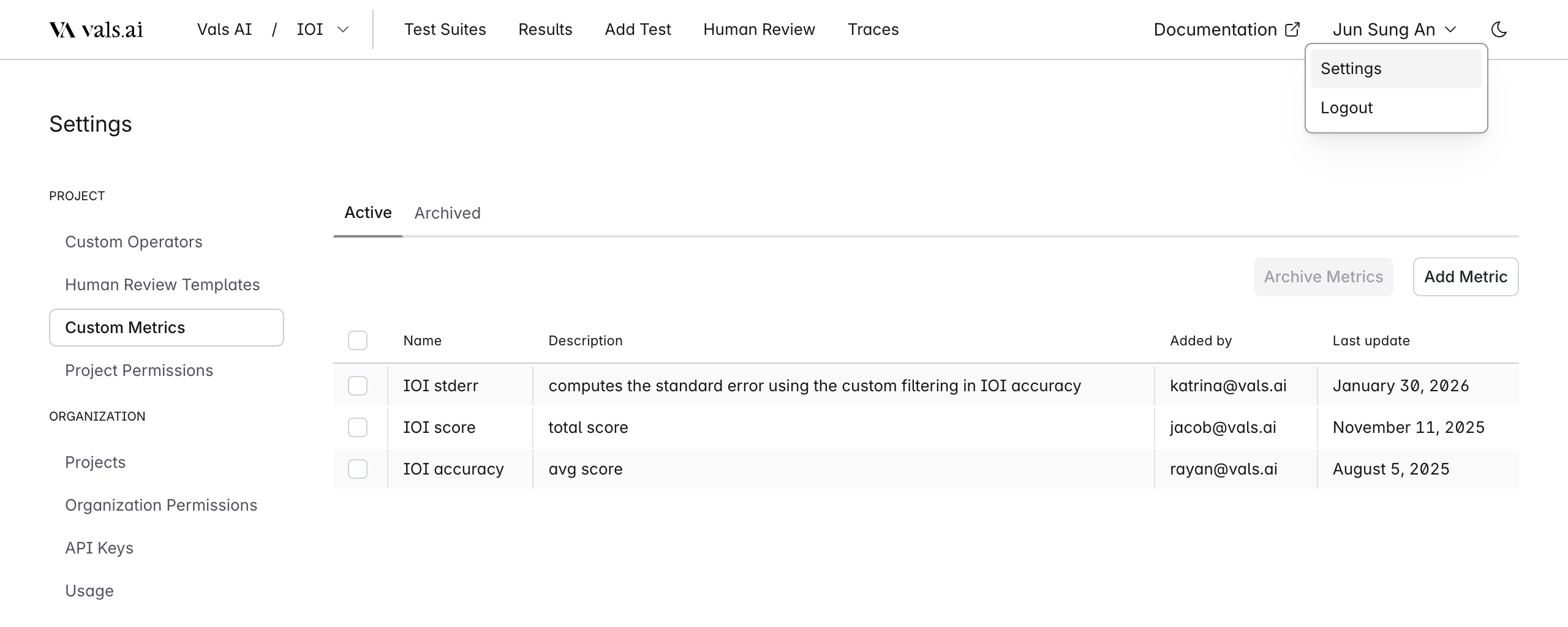
Custom Metrics can be managed from the Settings page, which you can access by clicking your username in the top right corner.
 # Creating Custom Metrics
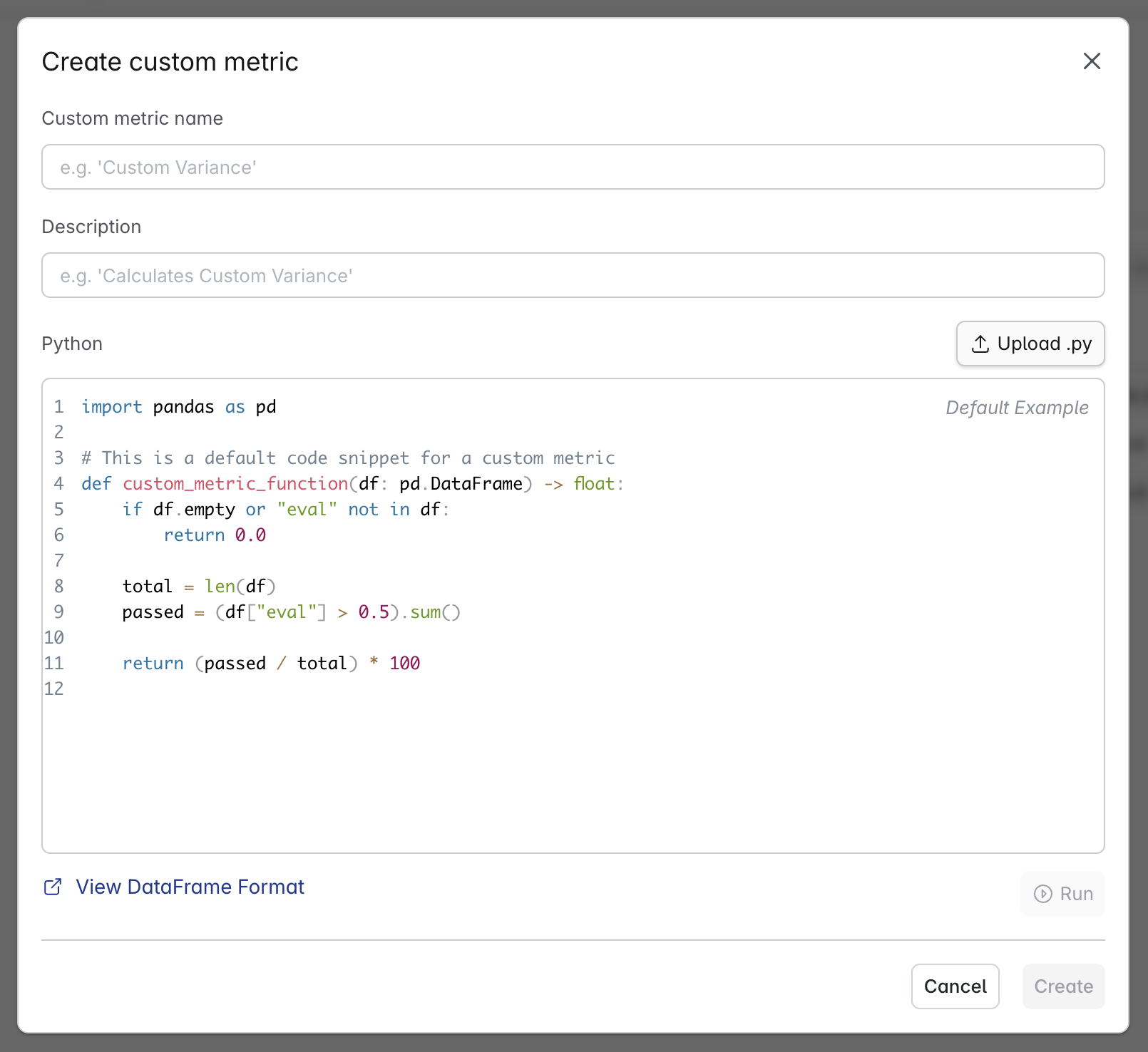
Each custom metric is defined by a name and a python function, with an optional description.
# Creating Custom Metrics
Each custom metric is defined by a name and a python function, with an optional description.
 # Format
The function used for the custom metric **must** match the following signature:
```python theme={null}
def custom_metric_function(df: pd.DataFrame) -> float:
```
You may define any other functions and use them, but the entrypoint must be `custom_metric_function`.
The function takes in a pandas DataFrame, and returns a float representing the pass rate.
You have access to all fields in the DataFrame, the format is as follows:
> NOTE: Each row in the DataFrame represents a Check Result
| Field | Type | Description |
| --------------------- | --------------- | ------------------------------------------------------------------------------------------- |
| `id` | `string` | Unique identifier |
| `tags` | `array[string]` | Tags defined inside of the test |
| `input` | `string` | Input provided to the LLM, etc. "What is QSBS?" |
| `input_context` | `object` | Context provided alongside the input (ex. conversation history) |
| `output` | `string` | The LLM output model's generated response. |
| `output_context` | `object` | Context provided alongside the output. (ex. reasoning) |
| `right_answer` | `string` | The right answer (user provided) |
| `refused_to_answer` | `boolean` | Whether the model refused to answer the prompt |
| `is_rephrasal` | `boolean` | Indicates if this was a rephrased version of another input |
| `been_rephrased` | `boolean` | Indicates if this input has been rephrased into other versions |
| `file_ids` | `array[string]` | IDs of associated files |
| `operator` | `string` | Operator used for evaluation (e.g., `equals`, `contains`). |
| `criteria` | `string` | The key concept, keyword, or criteria that evaluation is focused on (e.g., `"Copernicus"`). |
| `eval` | `number` | Binary evaluation score: `1` for pass, `0` for fail. |
| `cont` | `number` | Confidence score |
| `feedback` | `string` | Textual explanation or reasoning for the evaluation decision. |
| `is_global` | `boolean` | Whether the test case was applied globally or within a specific subset. |
| `modifiers.extractor` | `string` | Extraction modifier |
Example:
```python theme={null}
"""
{
"id":"852b5372-6768-4cb2-8f88-9937bda73fc4",
"tags":[
"HISTORY",
"$200",
"Jeopardy!"
],
"input":"'For the last 8 years of his life, Galileo was under house arrest for espousing this man's theory'",
"input_context":{},
"output":"Galileo Galilei was under house arrest for espousing the heliocentric theory proposed by Nicolaus Copernicus. Copernicus suggested that the Earth and other planets revolve around the Sun, which contradicted the geocentric view that was widely accepted at the time. Galileo's support of this theory, particularly after publishing \"Dialogue Concerning the Two Chief World Systems,\" led to his trial and subsequent house arrest by the Roman Catholic Church.",
"output_context":{},
"right_answer":"",
"refused_to_answer":false,
"is_rephrasal":false,
"been_rephrased":false,
"file_ids":[],
"operator":"equals",
"criteria":"Copernicus",
"eval":0,
"cont":0,
"feedback":"Text 1 provides detailed information about Galileo's support for the heliocentric theory and his subsequent house arrest, while Text 2 only mentions Copernicus without any context or details. The two texts do not cover the same core concepts or convey the same essential meaning.",
"is_global":false,
"modifiers.extractor":""
},
"""
```
# Testing Custom Metrics
Before creating or updating your custom metric, you should test it on a successful run result.
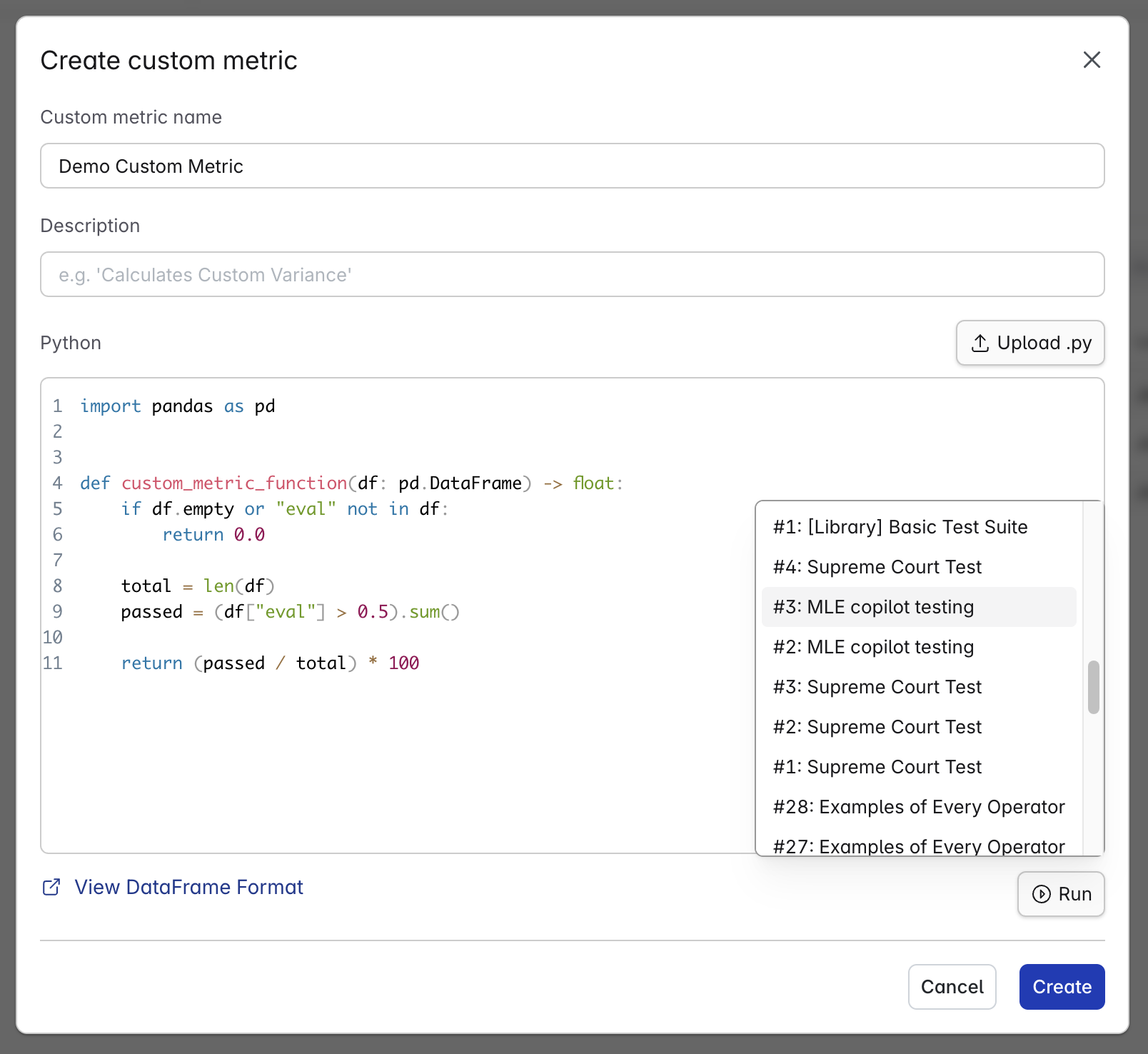
You can do this by clicking `Run` button located right below the code area, then selecting a run result.
This will run your custom metric as if it were being used in an actual run, and output the pass rate as well as any errors.
# Format
The function used for the custom metric **must** match the following signature:
```python theme={null}
def custom_metric_function(df: pd.DataFrame) -> float:
```
You may define any other functions and use them, but the entrypoint must be `custom_metric_function`.
The function takes in a pandas DataFrame, and returns a float representing the pass rate.
You have access to all fields in the DataFrame, the format is as follows:
> NOTE: Each row in the DataFrame represents a Check Result
| Field | Type | Description |
| --------------------- | --------------- | ------------------------------------------------------------------------------------------- |
| `id` | `string` | Unique identifier |
| `tags` | `array[string]` | Tags defined inside of the test |
| `input` | `string` | Input provided to the LLM, etc. "What is QSBS?" |
| `input_context` | `object` | Context provided alongside the input (ex. conversation history) |
| `output` | `string` | The LLM output model's generated response. |
| `output_context` | `object` | Context provided alongside the output. (ex. reasoning) |
| `right_answer` | `string` | The right answer (user provided) |
| `refused_to_answer` | `boolean` | Whether the model refused to answer the prompt |
| `is_rephrasal` | `boolean` | Indicates if this was a rephrased version of another input |
| `been_rephrased` | `boolean` | Indicates if this input has been rephrased into other versions |
| `file_ids` | `array[string]` | IDs of associated files |
| `operator` | `string` | Operator used for evaluation (e.g., `equals`, `contains`). |
| `criteria` | `string` | The key concept, keyword, or criteria that evaluation is focused on (e.g., `"Copernicus"`). |
| `eval` | `number` | Binary evaluation score: `1` for pass, `0` for fail. |
| `cont` | `number` | Confidence score |
| `feedback` | `string` | Textual explanation or reasoning for the evaluation decision. |
| `is_global` | `boolean` | Whether the test case was applied globally or within a specific subset. |
| `modifiers.extractor` | `string` | Extraction modifier |
Example:
```python theme={null}
"""
{
"id":"852b5372-6768-4cb2-8f88-9937bda73fc4",
"tags":[
"HISTORY",
"$200",
"Jeopardy!"
],
"input":"'For the last 8 years of his life, Galileo was under house arrest for espousing this man's theory'",
"input_context":{},
"output":"Galileo Galilei was under house arrest for espousing the heliocentric theory proposed by Nicolaus Copernicus. Copernicus suggested that the Earth and other planets revolve around the Sun, which contradicted the geocentric view that was widely accepted at the time. Galileo's support of this theory, particularly after publishing \"Dialogue Concerning the Two Chief World Systems,\" led to his trial and subsequent house arrest by the Roman Catholic Church.",
"output_context":{},
"right_answer":"",
"refused_to_answer":false,
"is_rephrasal":false,
"been_rephrased":false,
"file_ids":[],
"operator":"equals",
"criteria":"Copernicus",
"eval":0,
"cont":0,
"feedback":"Text 1 provides detailed information about Galileo's support for the heliocentric theory and his subsequent house arrest, while Text 2 only mentions Copernicus without any context or details. The two texts do not cover the same core concepts or convey the same essential meaning.",
"is_global":false,
"modifiers.extractor":""
},
"""
```
# Testing Custom Metrics
Before creating or updating your custom metric, you should test it on a successful run result.
You can do this by clicking `Run` button located right below the code area, then selecting a run result.
This will run your custom metric as if it were being used in an actual run, and output the pass rate as well as any errors.
 # Using Custom Metrics
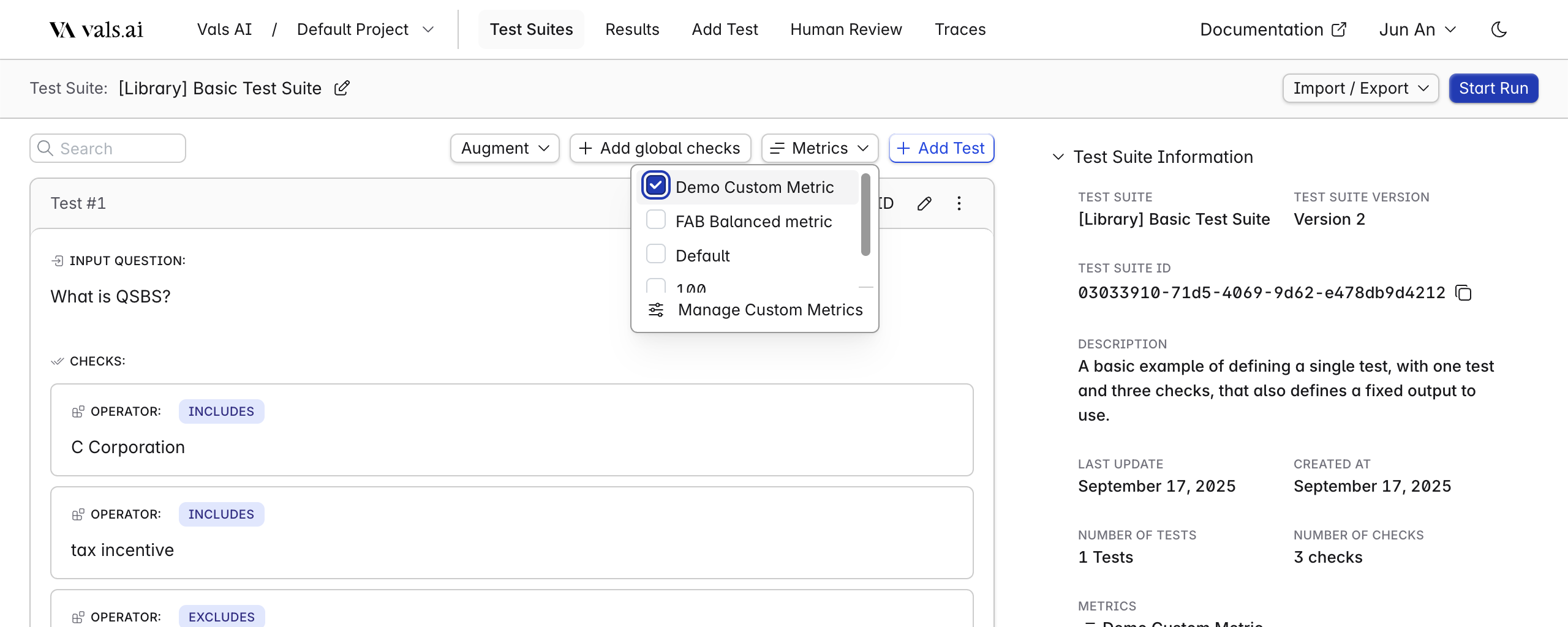
To use your custom metric, simply select it inside your test suite. Any subsequent runs will use all custom metrics selected.
# Using Custom Metrics
To use your custom metric, simply select it inside your test suite. Any subsequent runs will use all custom metrics selected.
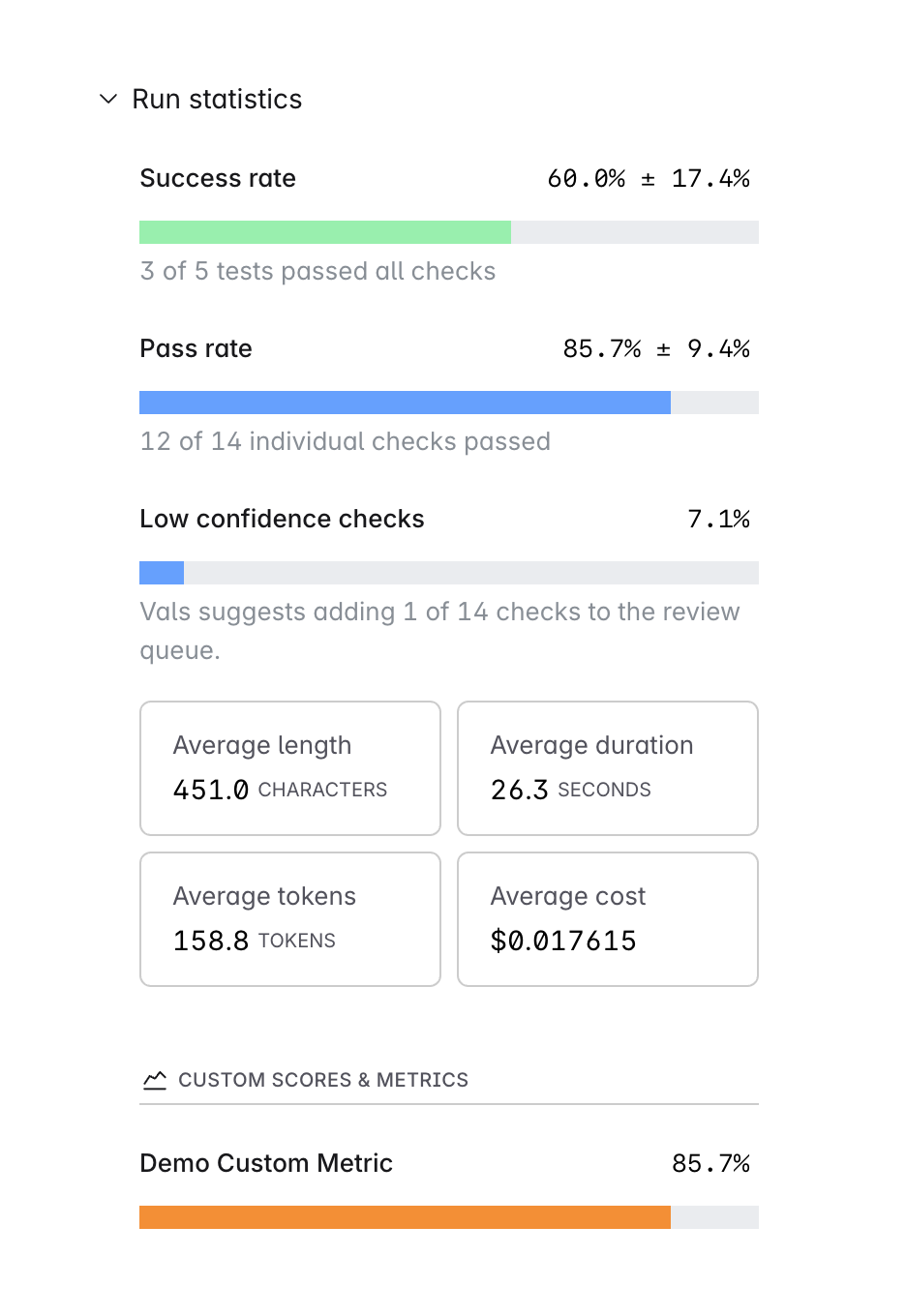
 The custom metric pass rate will be displayed in the run result page, under Run Statistics
 # Updating past runs
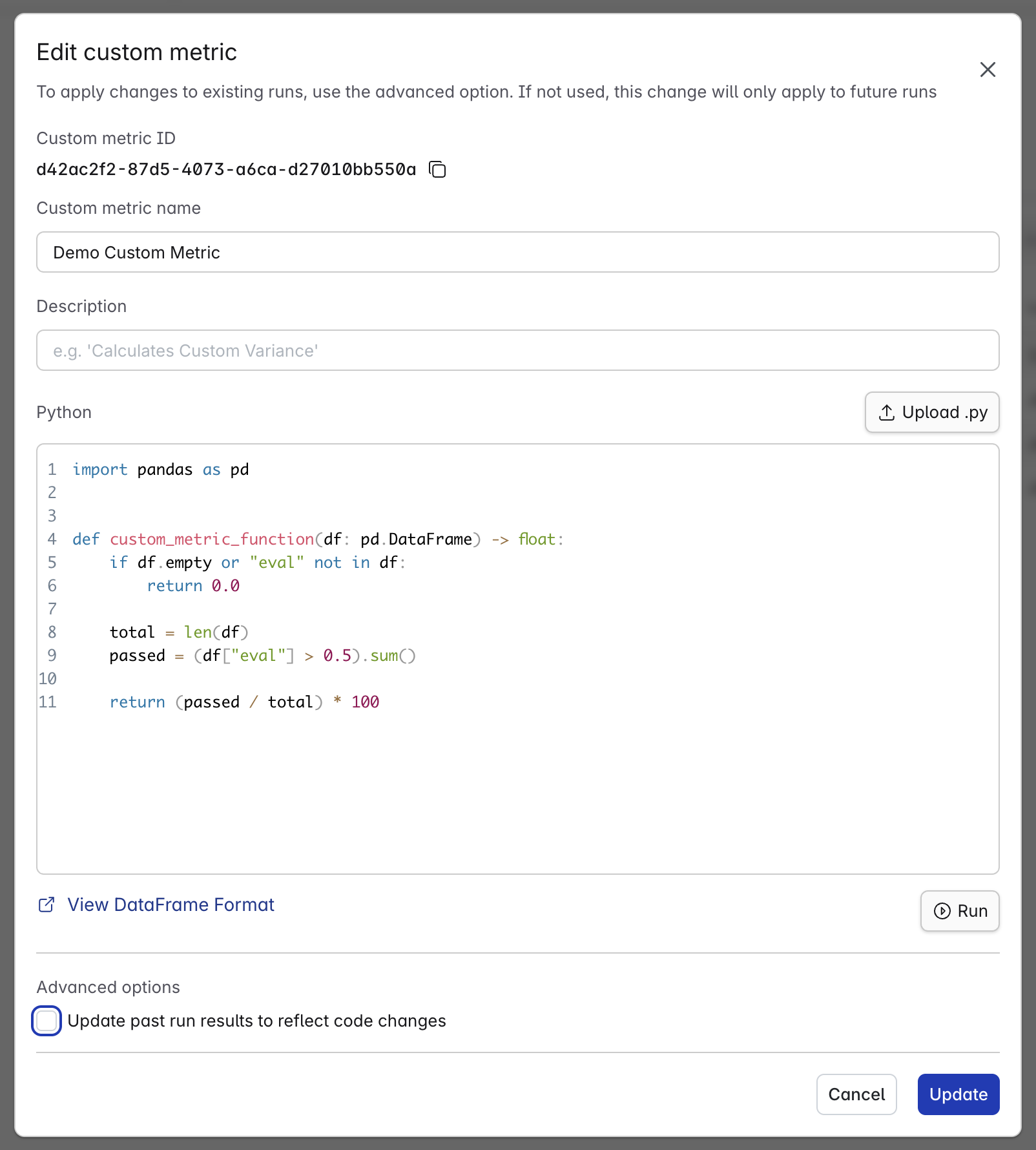
When updating a custom metric, you can choose to apply the changes to all previous runs that used this metric. If selected, the system will re-run the updated metric on those past runs and recalculate the pass rate for each, displaying the revised results.
# Updating past runs
When updating a custom metric, you can choose to apply the changes to all previous runs that used this metric. If selected, the system will re-run the updated metric on those past runs and recalculate the pass rate for each, displaying the revised results.